
ESS Utumishi Dashboard: Complete Guide to Portal Services, Salary Slip, Leave & Performance Tools
The ESS Utumishi Dashboard and Portal Services are one of the most important digital tools for government employees in Tanzania. With this system users can remove delays and reduce paperwork. There is no need to visit offices for HR services. Now, thousands of public servants use ESS Utumishi. They can check their salary slips, apply for leave, view performance reports and request for transfer. This dashboard is just like a central control panel.
The employees can manage everything about their job in one place. Tanzania continues to improve digital services and the portal has become more advanced and reliable. It offers transparency and accuracy for all users. The employees can access HR services whether they work in ministry departments, council, or government agencies.
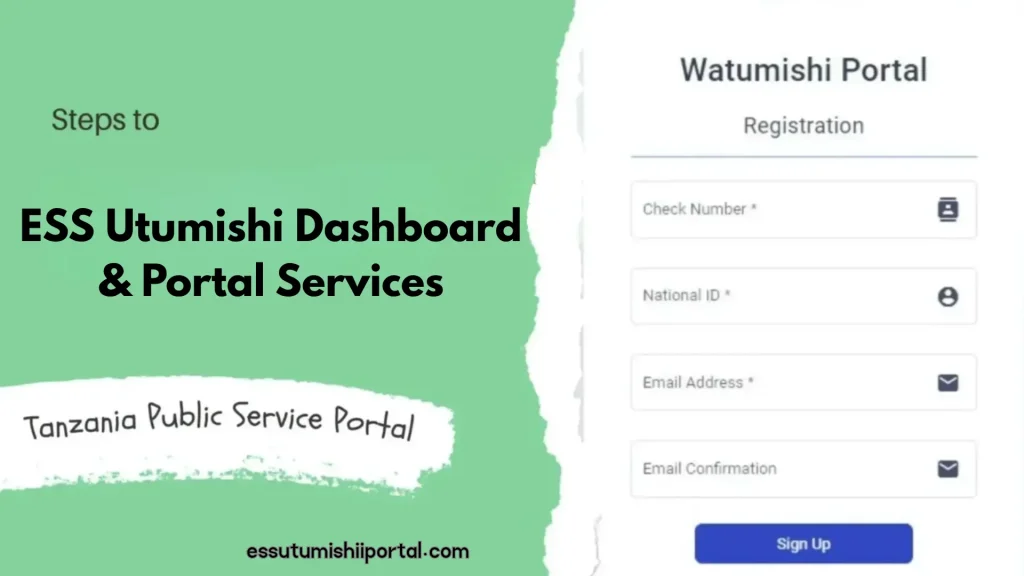
What Is the ESS Utumishi Dashboard?
The ESS Utumishi Dashboard is the main page you see after you log in to the system. There is all the important information about your job and HR services. In the past, employees had to stand in long lines and deal with paperwork. Now, the dashboard brings everything together. These things include salary slip, leave request, transfer options, personal details and performance reports. Each service is arranged in simple categories.
In this way you can complete your tasks quickly and without confusion. This dashboard has a clean design that new users can understand easily. It helps the employees to make fast decisions and reduce communication delays. It can keep them updated through real time alerts and reminders.
Main Components of the ESS Utumishi Dashboard
1.Personal Information Summary:
This section shows your basic personal and job details. It includes your full name, check number, job title, workstation, department, phone number and NIDA Information. For proper communication, these details have to match the HR records. You can update your contact information. In this way you don’t miss important SMS alerts or verification codes. You can receive fast updates when the information is correct. It keeps your profile clean and reduces mistakes.
2.Salary Slip & Payroll Portal:
This is one of the most used parts of the dashboard. It allows you to view, download and print your monthly salary slip anytime. There is no need to wait for HR to prepare a paper copy. This system stores all your digital salary slips every month. It also includes your basic salary, allowances, deductions and net pay. You can also check your old salary slips from past years to see your income history.
| Detail Type | What you can view | Benefits |
| Basic Salary | Your monthly base pay | Helps track income |
| Allowances | Housing, transport, medical etc | Gives financial clarity |
| Deductions | Loans, taxes, contributions | Ensures transparency |
| Net Pay | Final amount you receive | Helps with budgeting |
| Past Salary Slips | Full salary history | Useful for documentation |
3.Leave Management System(LMS):
With this section you can apply for leave online without going to the office. You can choose different types of leave like annual, sick, maternity, study or emergency leave. You can upload any required documents like medical reports. The dashboard shows your leave status like whether it’s pending or approved. The supervisors can approve leave easily which can reduce paperwork and speed up the process.
| Leave Type | Purpose | Approval Time |
| Annual Leave | Vacation | 1 – 3 days |
| Sick Leave | Health issues | Same day |
| Maternity Leave | Pregnancy related | Pre approved |
| Study Leave | Education | Depends on ministry |
| Emergency Leave | Urgent situations | immediate |
4.Transfer Request Management:
The employees who want to transfer to another station or department can request it through this section. There is no need to write letters or follow up physically. You can upload supporting documents and can track each stage of the process. It can keep the process clear and transparent. This reduces the delays and prevents lost documents.
5.Performance Evaluation(PEPMIS integration):
The dashboard connects directly with PEPMIS which can track employees’ performance. You can see your assigned tasks, deadlines and supervisors comments. PEPMIS use colors to show status like:
This helps you to stay organized and improve your performance. Supervisors can also make fair reviews based on real time data instead of guessing.
6.Training & Professional Development:
This section shows available government approved training programs. It also shows workshops and online courses. The employees can apply directly for these opportunities. Supervisors can see who has completed training and assign new programs. This helps the employees to build skills and increase their chances for promotion.
7.Document Management System:
This part stores important documents like appointment letters, confirmation letters, certificates, transfer letters and performance reports. All the files are kept safely in digital form. You can download or print them anytime. This is useful for job applications, promotions or bank loan requirements.
8.Notifications & Announcements:
The dashboard gives real time updates about important events. It includes:
The employees can never miss important information because everything appears instantly on the dashboard.
ESS Utumishi Dashboard Layout Overview
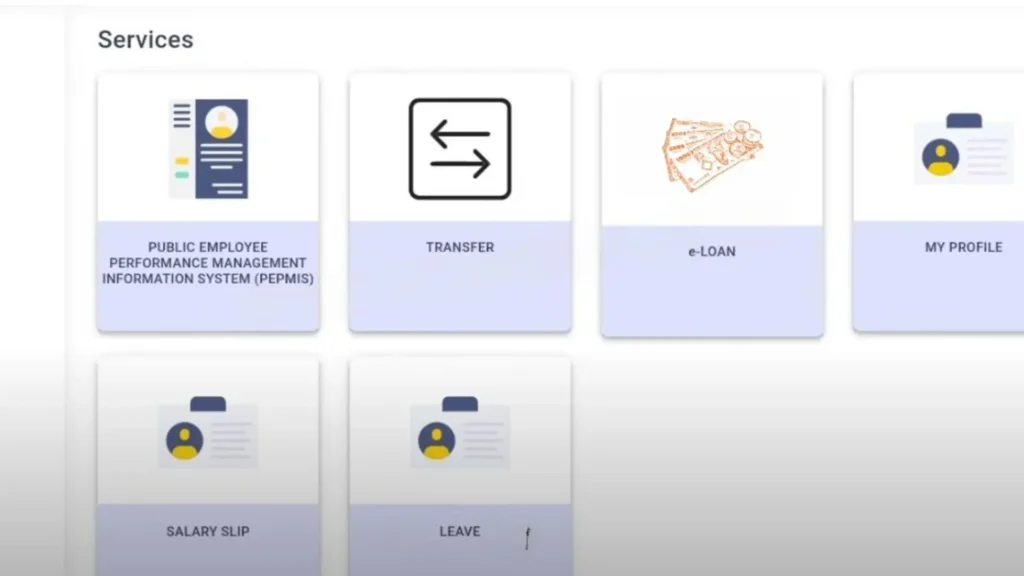
The ESS Utumishi Dashboard is made to help employees to see all important job services in one simple view. When you log in, you will see different icons which are arranged in neat rows like salary slip, leave management, PEPMIS, transfer, training, notice and help desk. Each icon opens a separate service that replaces old manual processes. The dashboard uses clear colors and simple symbols. The users can understand everything without any special training.
It works well on mobile phones because the layout adjusts automatically for small screens. This friendly design makes it easy for all employees. The people who are not familiar with computers can also manage their work and access important information anytime.
| Dashboard Section | Purpose | Who uses it |
| Salary Slip Portal | Lets you view, download and save your monthly salary slip | All employees |
| PEPMIS | Used to check work performance, tasks and supervisors feedback | Employees and supervisors |
| Leave Management | Helps you to apply for leave and allows supervisors to approve it online | Employees and supervisors |
| Transfers | Allows you to submit and track transfer requests without paperwork | All employees |
| Notices | Shows important HR updates, deadlines and announcements | All employees |
| Training | Used to join courses, workshops and download training certificates | All employees |
| Help Desk | Lets you report technical issues and receive support | All employees |
ESS Utumishi User Roles & Access Levels
The ESS Utumishi portal gives different access rights to users on job roles. The regular employees can only see their own details like salary slips, personal information, training records and leave balances. The supervisors have more control like they can approve leave, check PEPMIS reports and give feedback. The HR officers handle big tasks like updating employee records, managing transfers, adjusting payroll and fixing employment history.
The system administrators manage the whole platform. They ensure data safety, solve technical issues and control who can access. These access levels keep the system safe and transparent. It is also protected from unauthorized actions.
| User Role | Permissions | Restrictions |
| Employee | Can view salary slips, leave details and PEPMIS information | Cannot change job position or payroll details |
| Supervisor | Can approve leave and check or evaluate staff performance | Cannot change salary or give promotions |
| HR Officer | Can update employee records and manage transfer approvals | Cannot access system wide admin settings |
| System Admin | Has full access to all tools and settings in the system | No restrictions |
Special Modules for Supervisors & HR Officers
Supervisors and HR officers in ESS Utumishi have special tools that help them to manage employees easily. Supervisors can view leave requests, approve or reject them. They can also assign tasks and monitor staff performance. They can do it through a simple dashboard. HR officers have advanced tools that allow them to update employee records. They can manage transfers, correct job information and handle payroll related details without using paperwork.
There is also an audit trail which can record the changes in the portal. It maintains transparency, improves accuracy and makes it easy to identify the changes. These features ensure smooth operations and protect sensitive government data.
ESS Utumishi Security & Authentication Features
1.Login Verification Steps:
The ESS Utumishi system uses a secure login process to protect user accounts. Employees have to enter their username and password. There is also a need for a verification code which is sent to the phone or email. With these steps the right person can access the account.
2.Password Strength Requirements:
The system requires a strong password to keep the account safe. The users have to create a password that includes letters, numbers and special characters. In this way no one can guess or hack the account.
3.Account Protection & Auto Logout:
The system automatically logs out when someone leaves the account open for too long. In this way the unauthorized people can’t get access to the information. The system locks the accounts after several wrong attempts.
4.System Monitoring for Suspicious Activity:
The portal constantly checks for unusual or suspicious activity. If it detects something strange the system alerts the user or temporarily blocks access. This includes repeated failed logins or access from unknown devices. This helps the government to keep data safe and secure.
5.Data Encryption:
All information on the ESS Utumishi portal is protected using data encryption. This means that your personal and job related details are turned in to secure code. When it is stored or transmitted, this makes it hard for anyone to steal or misuse the data.
ESS Utumishi Security & Authentication Features
| Aspect | Desktop | Mobile |
| Key Difference | Shows detailed information, large layout, full dashboard view | Simplified layout with easy to tap icons for quick use |
| Best Features to use | Detailed PEPMIS reports, training analytics, payroll history and admin tools | Quick access to salary slips, leave applications, notifications and basic updates |
| Navigation | Uses menus, tables and full size tiles for easy reading | Uses touch friendly icons and simple navigation for small screens |
| Use Case | Ideal for office work and detailed analysis | Ideal for checking updates on the go or in rural areas |
| Speed & Convenience | More features but may take longer to find quick info | Faster for immediate tasks, less detailed but convenient |
Help Center & Self-Support Tools
The ESS Utumishi portal has a helpful support system to assist employees with any problems. It includes user guides and FAQs that explain about the usage of the dashboard. You can check salary slips, apply for leave or update personal information. If you face a technical issue, you can submit a support ticket directly from the dashboard. The support team will respond with instructions or solutions. The portal.provides quick fixes for common problems. These problems include dashboard loading errors, missing salary slips or PEPMIS access issues.
For first time users, the help center gives tips and step by step instructions. In this way the navigation system becomes easy. The employees can find guidance on how to update personal information safely. Overall, the support system ensures that anyone can use ESS Utumishi and get help quickly. They can continue their work without interruptions.
Why the ESS Utumishi Dashboard Is Important
Conclusion
The ESS Utumishi Dashboard and portal is a powerful tool that makes life easy for Tanzanian government employees. It brings all HR services like salary slips,leave requests, transfers, performance tracking and training. You can get all these in one platform. This system saves time and reduces paperwork. It allows the employees to access important information anytime. There is secure data management and automated processes.
It improves transparency, accountability and accuracy. The supervisors and HR officers can manage tasks more efficiently. The employees can stay informed and organized. In short, ESS Utumishi supports a modern and efficient public service. It helps everyone to work smart and fast.
Frequently Asked Questions
1.What is the ESS Utumishi Dashboard?
It is an online platform for Tanzanian government employees to access HR services. The dashboard collects all job related tools in one place and makes it easy to manage your work.
2.How do I log into the ESS Utumishi Dashboard?
You log in by visiting the official portal and enter your check number and password. After logging in, the dashboard opens automatically and shows all the available services.
3.What services can I access from the dashboard?
You can view and download salary slips, apply for leave, submit transfer and request. They can update personal information and check PEPMIS performance. You also get notification and updates about training programs.
4.Why is PEPMIS included in the dashboard?
It helps to track your tasks, deadlines and performance. It allows supervisors to evaluate your work and give feedback easily.
5.Can I download my salary slip from the dashboard?
The salary slip portal lets you download your monthly salary slip as a PDF. You can also check old salary slips anytime.
6.Is the ESS Utumishi Dashboard secure?
The portal uses encryption, verified login steps and regular security updates to protect your information. It ensures safe access for all government employees.