
How to Update Your Profile on ESS Utumishi: Complete Guide for Government Employees
ESS Utumishi is an important online system which is used by government employees in Tanzania. It helps to manage your personal information, salary, leave, training and other work related details. By using ESS Utumishi employees can access their records anytime without visiting the HR Office. Keeping your profile updated is very important. It is very important to keep your profile updated.
If you have correct information in your ESS profile, it can help the HR to process your salary, leave, promotion and allowances. By updating your profile regularly you can help the government to keep accurate records. With an up to date profile it is easy to handle emergencies or sudden changes. You can stay organized and avoid unnecessary delays by keeping your information current.
Why Update Your ESS Utumishi Profile?
Keeping your profile up to date is very important. HR can manage your records correctly with accurate information. This can include processing your salary, leave application, promotions and training records without mistakes. An updated profile makes it easy for the government to keep accurate employee records. You can receive important notifications on time.
You can avoid delays and prevent errors by regularly updating your profile. The updated profile also helps in emergencies. The HR can contact you quickly or verify your details. It can support career growth and record all your achievements, training and qualifications.Overall, an updated profile can save time, reduce confusion and handle all information correctly.
What Information Can You Update on ESS?
1.Personal Details:
The personal details include name, phone number, email address and home address. You should keep your information correct so HR or supervisors can contact you easily. You can miss important notifications or documents if your details are wrong. The accurate personal information also prevents mistakes in official records. Always double check the details while updating the profile.
2.Employment Details:
It can include your department, job title and supervisor information. It is important to update these details if you get a promotion or transfer to a new department. With accurate information, the HR can correct work history. Your leave performance reports and other HR processes can be recorded properly.
3.Salary and Banking Information:
This section includes your bank account number, salary details and allowances. With updated information, your salary and other payments are sent to the correct bank account. The wrong or outdated information can delay your payments or cause errors. The HR can process your salary smoothly with current banking details. Always double check your account numbers before saving changes.
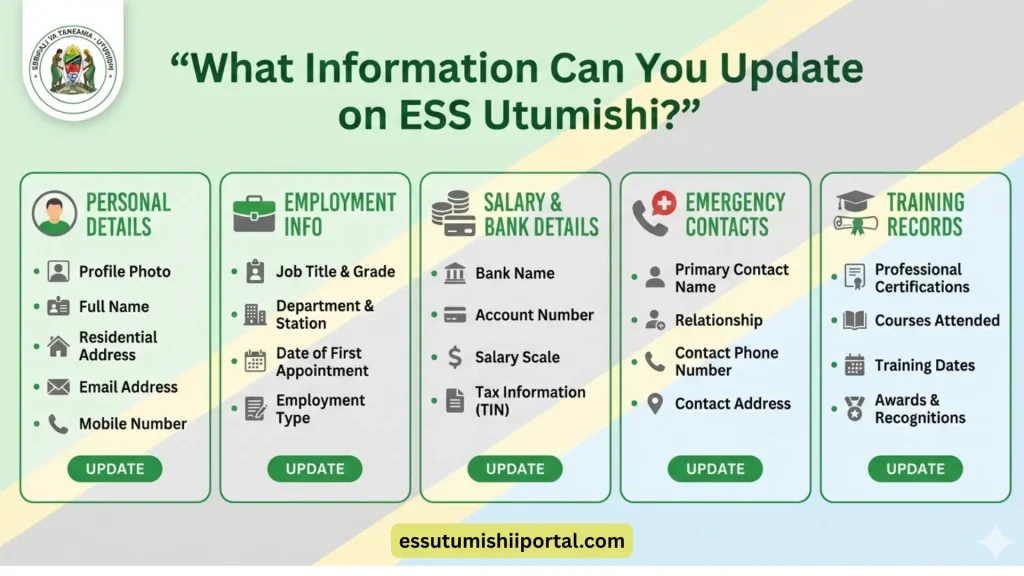
4.Emergency Contacts:
The emergency contacts are the people that HR can contact when something is urgent. It may be your family members, friends or a trusted person. To avoid accidents or health emergencies it is good to keep the information correct. The HR can contact your emergencies contact when they cannot reach you directly.
5.Training and Qualifications:
You can add courses, certificates or training programs with this section. HR can track your professional development and career growth with updated information. The accurate training information can support promotions, job assignments and performance evaluation. Always include the latest qualifications and courses to keep your profile complete.
Step-by-Step Guide to Updating Your ESS Profile
1.Log in to your ESS Account:
2.Access the Profile Section:
3.Edit Personal Information:
4.Update Employment Details:
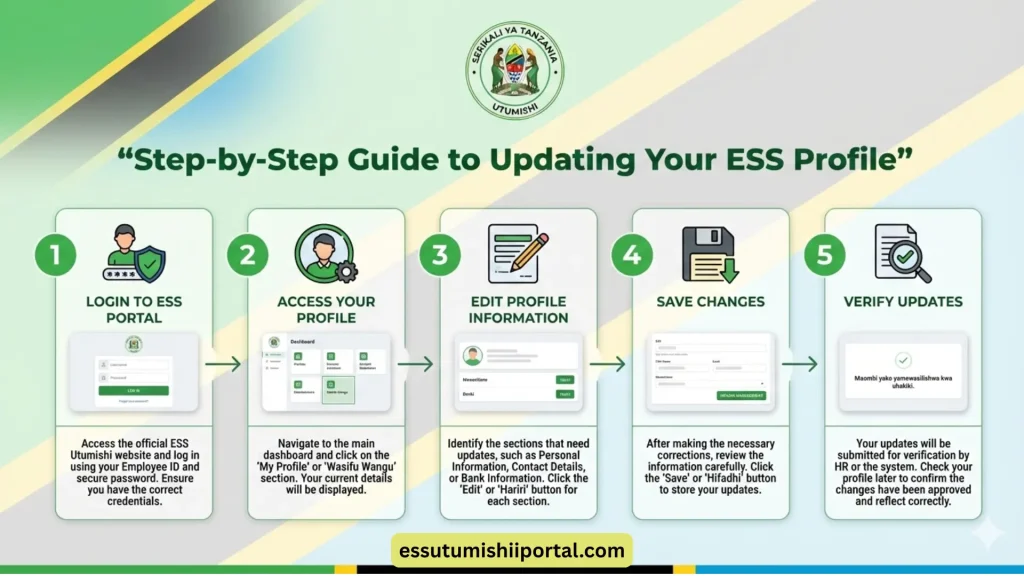
5.Update Banking and Salary Information:
6.Add Training and Qualification Details:
7.Save Changes and Verify:
How to Handle Issues or Errors While Updating
The first step is to understand the issue if you face problems while updating your ESS profile. You can contact the HR if the problem is related to your personal details, job information, department, bank or any update. The HR can verify and correct your records. For technical issues you can contact ICT support for help. These issues include login errors, pages not loading or changes not saving You can try simple troubleshooting to solve these issues.
The troubleshooting includes refreshing the page, logging out and back in, clearing your browser cache or using a different browser or device. To solve the issue you can also check your internet connection. These small steps can fix the issue quickly and save time.
How Often Should You Update Your ESS Profile?
To keep your information correct and up to date, you should update your ESS profile regularly. You should review your profile every few months. It makes sure that all the details are accurate.You should update your profile immediately if there is any important change. These changes are job title, transfer to another department, change in salary or bank details or a new phone number. The updated information helps the HR to process your salary, leave and records smoothly. It can also prevent delays or mistakes.
Tips for Keeping Your ESS Profile Safe and Secure
Common Mistakes to Avoid While Updating Your ESS Profile
1.Entering Wrong Details or Typos:
Many users make small typing mistakes while updating their profile. It can cause serious problems if there are wrong spellings, incorrect phone numbers or missing digits in bank accounts. Before saving it is good to type slowly and check all details. The small errors can delay salary, leave approval or communication.
2.Ignoring Mandatory Fields:
Some fields in the ESS are required and cannot be skipped. If you leave them empty, the system may not save your changes. It can cause incomplete records and errors. Before submitting, fill in all required fields. It can be marked with an asterisk.
3.Skipping Verification Steps:
There is a need for confirmation or HR approval in some updates. Your changes may not be saved if you skip verification steps or close the page. It is good to follow the full process and wait for confirmation messages. You can contact the HR to complete the update if verification is needed.
4.Not Saving Changes Properly:
Many users update the information but they can forget to click the Save or Submit button. All the changes can be lost if this happens. Before leaving the page it is good to save your updates and wait for a confirmation message.
5.Using Old or Incorrect Documents:
If you upload outdated or wrong documents it can cause updates to be rejected. It can cause problems if there are wrong documents, old certificates or incorrect bank letters. To avoid delays, upload clear and correct documents. These documents can match your current information.
Conclusion
Keeping your ESS Utumishi updated is a yet crucial responsibility. By logging in and reviewing your profile information, job details, bank account info and training history you ensure that all your data is accurate.Consistently check your modifications. Ensure they are saved correctly to prevent errors. Precise and current details enable HR to handle your salary, leaves, promotions and training promptly. It also aids your development and guarantees timely receipt of crucial communications.
Keeping your profile current keeps you orderly prevents issues. Simplifies your work experience. A refreshed profile allows HR to reach you regarding any essential messages or alerts. It facilitates your promotions, transfers and forthcoming career opportunities. When your information is correct your work life becomes smooth and stress free.
Frequently Asked Questions
1. Am I able to modify my ESS profile without obtaining HR approval?
You are allowed to modify information such as phone number, email and address without obtaining HR approval. Nevertheless alterations concerning job title, department or employment status typically require consent from HR.
2. What is the typical duration for profile changes to become visible?
The majority of updates become visible right after you save them. Certain modifications might require an hour or up to one business day if they need HR approval.
3. What actions should I take if my changes aren’t being saved?
First check if all required fields are filled. Make sure you click the save button. Log out and log in again to check.
4. Am I able to change my bank details on my own?
Yes you can update your bank details in the ESS system. However you must enter the correct information.
5. Who is able to view the details I update on ESS?
Your updated information is mainly seen by HR and authorized government officials. The system is secure and your persona