
ESS Utumishi Registration: How to Sign Up, Requirements, and Step-by-Step Guide
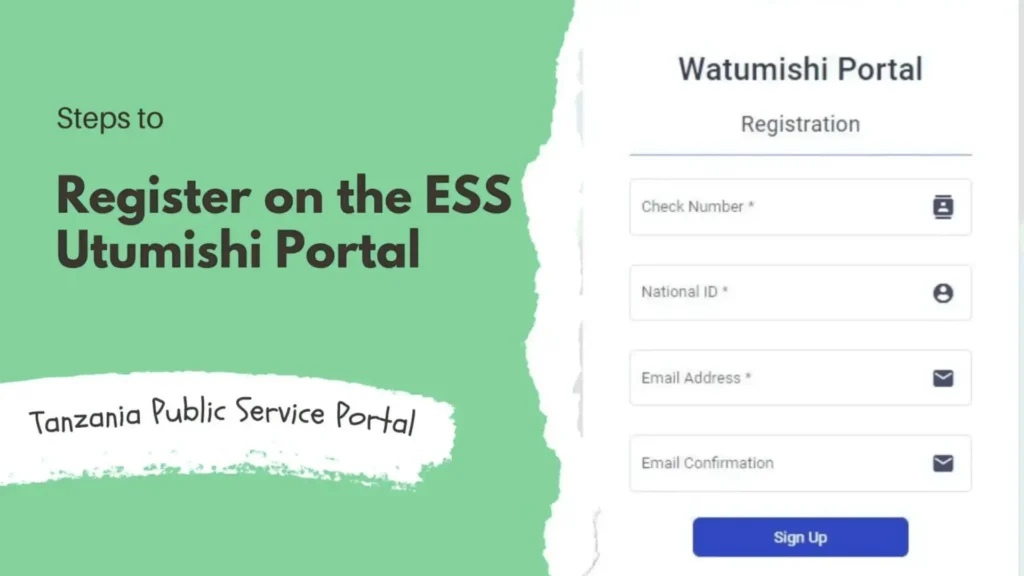
The ESS Utumishi is an online platform which is created by the Government of Tanzania. It is created to help all government employees access the important job-related services easily. “ESS stands for Employee Self Service, which means employees can manage their work information and tasks. Registration on this portal is very important for Tanzanian government employees. It helps them to view their salary details, track work performance, apply for leave, and even access loan services. They can do this without visiting the office.
This portal is designed to be user-friendly, secure, and convenient. This makes it easy for employees to handle official matters online. The employees can save time, reduce paperwork, and take full advantage of the government’s digital services. They can do all these tasks by signing up for the app. They can also stay informed and up to date with their work-related information.
Who Can Use the ESS Utumishi Portal?
1. Eligibility Criteria for Registration:
You must be a Tanzanian government employee to use the ESS Utumishi. This portal is made to help public servants access their work information easily. The employees must have official government employment and be recognized by their department. You cannot register if you are not a government employee. Only authorized people can use the portal safely.
2. Government Employees vs Other Employees:
The government employees can register on the ESS Utumishi portal. People who are working in private companies or non-government organizations cannot create an account. This portal is specifically for public service staff to manage salaries, leave, performance, and other job-related tasks online. It helps to protect sensitive information and ensures that governments are accessed by the right people.
3. Age or Documentation Requirements:
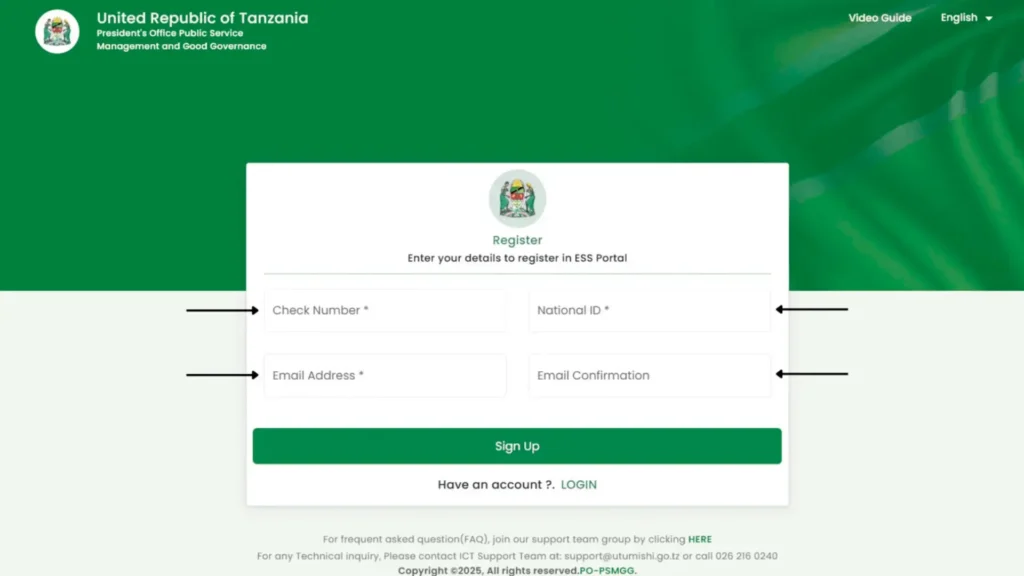
There is no strict age limit for registration. You must be legally employed as a government worker. You also need some important documents to register. These include a valid National ID card, a check number, and an active email address. With these documents, the registration process becomes smooth, and you can avoid mistakes. With the proper documentation, your identity and employment status are verified safely.
Documents Required to Register
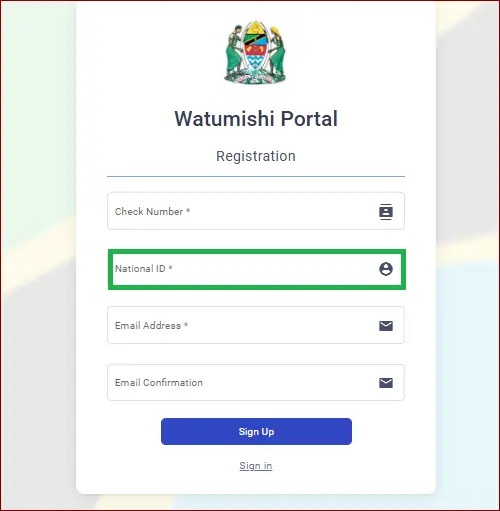
1. National ID Card:
To register on the ESS Utumishi Portal, a valid National ID card is required. It can prove your identity and confirm that you are a legal citizen of Tanzania. The portal will use this information to verify your employment and personal details. Your ID card must be current and not expired. For a fast process, it is good to keep the ID card ready before registration.
2. Check Number:
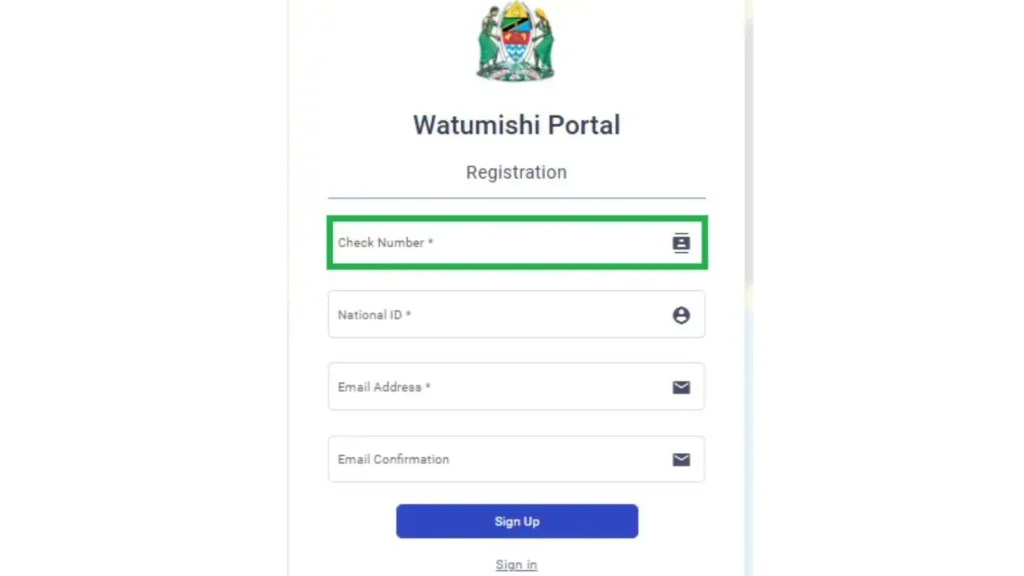
The check number is a unique number that is assigned to government employees for salary and payment purposes. You will need to enter it to link your portal account to your employment records. On your official document, use the correct number when it appears. It can cause registration errors or delays if you use the wrong check number.
3. Email Address:
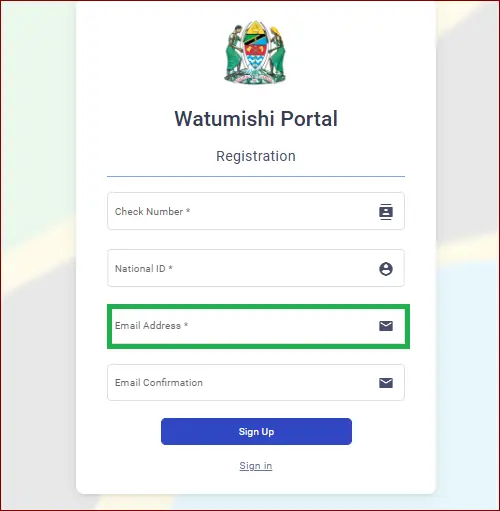
For portal registration, a valid and active address is required. In this email, you can receive your username, password, and important notifications. The portal will send a verification link to it, so enter the email correctly. For this purpose, use a personal email that you frequently check. Avoid using temporary or inactive email accounts to prevent problems.
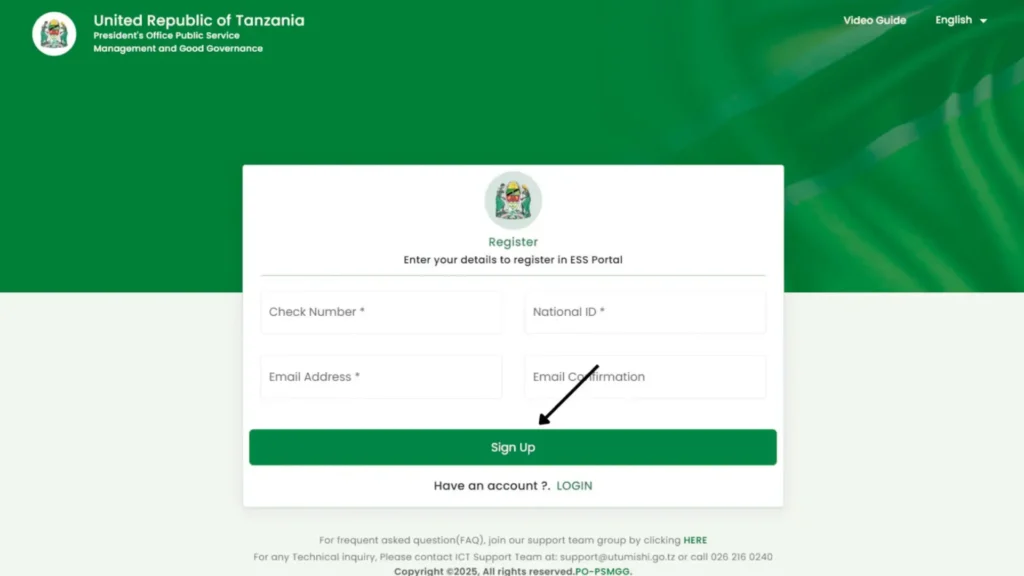
Before starting registration, collect all required documents and check their accuracy. Double-check your National ID number, check number, and email address. Keep your documents with you to fill out the registration form. Enter all the details carefully to avoid typos. Being prepared will make the registration process smooth and error-free.
Step-by-Step Guide to Register on the ESS Utumishi Portal
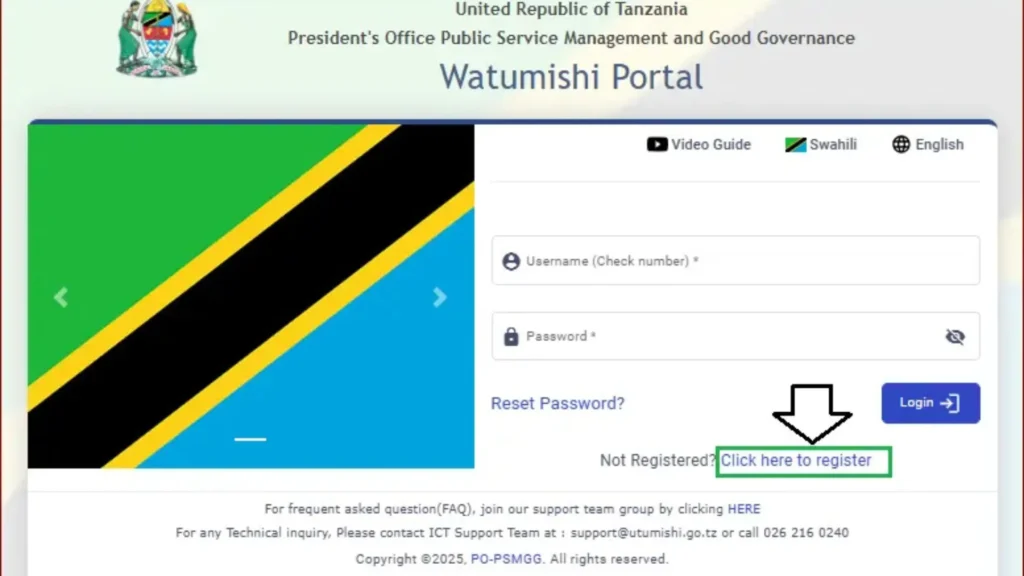
How to Log In After Registration?
ESS Utumishi Mobile App Registration and Access
This app makes it easy for government employees to access their work information from their phones. From the Google Play Store, you can download the app. You can simply search for “ESS Utumishi” and install it. When the app is on your phone, you can register as a new user. You have to enter your National ID number, check number, and email. You can also use the username and password you received during registration. This app works just like a website. But it is faster and convenient. You can check your salary details, leave information, or personal records anytime.
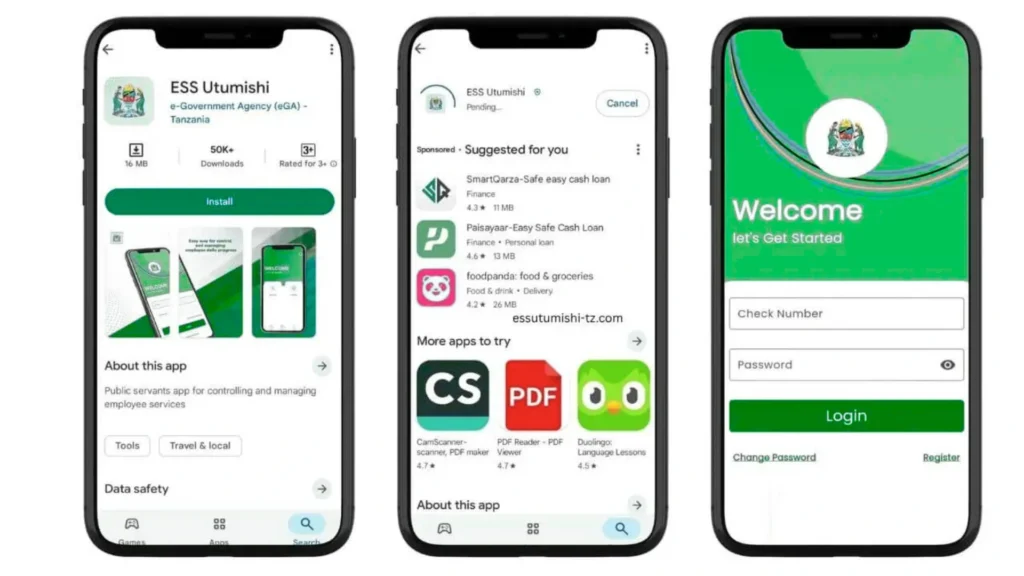
If you prefer using a big screen, the web browser is better. You can choose according to your needs because both options offer the same services. When there are updates, the app sends quick notifications. In this way, you never miss important information. It helps to avoid the need to visit the office. It saves time and effort. Overall, the app makes government services simple, smooth, and accessible for every employee.
Using the ESS Utumishi Portal
1. Overview of the Dashboard:
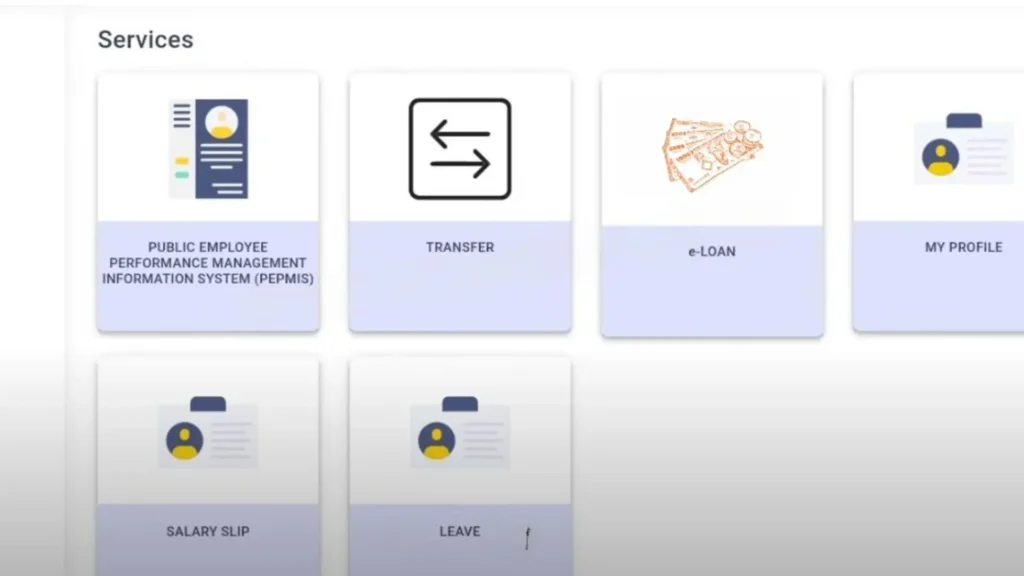
The ESS Utumishi dashboard is the main page you see after logging in. It is simple and user-friendly. The important services are arranged in separate sections. In this way, you can find everything quickly. You can see options like salary details, leave management, personal information, and loan services. This layout helps you to move from one service to another without any confusion.The dashboard is easy to understand, even if you are not good with technology.
2. Accessing Salary Details:
With the salary section, you can view all information about your monthly payments in just a few clicks. With this feature, you can check your basic salary, allowances, deductions, and net pay. You can stay updated about your earnings. To plan their monthly budget, many employees use this feature.There is always up-to-date information, which keeps it reliable and helpful.
3. Updating Personal Information:
You can edit and update your details in the personal information section. It includes your phone number, email address, home address, and emergency contacts. With updated information, you receive important notifications without any issue. The process is very simple: just open the section, make changes, and save them. There is no need to visit any office for small updates. It saves time and keeps your profile accurate.
4. Applying for Leave and Tracking Performance:
The leave section allows you to apply for leave without filling out paper forms or going to the HR Office. For approval, you can choose the type of leave, select the dates, and add a reason. The status of your leave request can be checked anytime. In the same area, you can track your work performance, evaluations, and reports. This helps to understand how you are performing and what improvements you may need.
5.Other Services Like Loan(“Mikopo”):
The portal also offers a loan section, which is called “Mikopo”. The government employees can apply for different loan options here. You can view available loan types, required documents, and repayment details. The application process is fully online, which makes it quick and convenient. You can track the status of your loan request when you submit the form. You can check it directly from your dashboard. With this feature, employees can get access to financial support without long queues or manual paperwork.
How to Apply for Loans on the ESS Utumishi Portal
1. Navigating to the “Mikopo” or Loan Service Section:
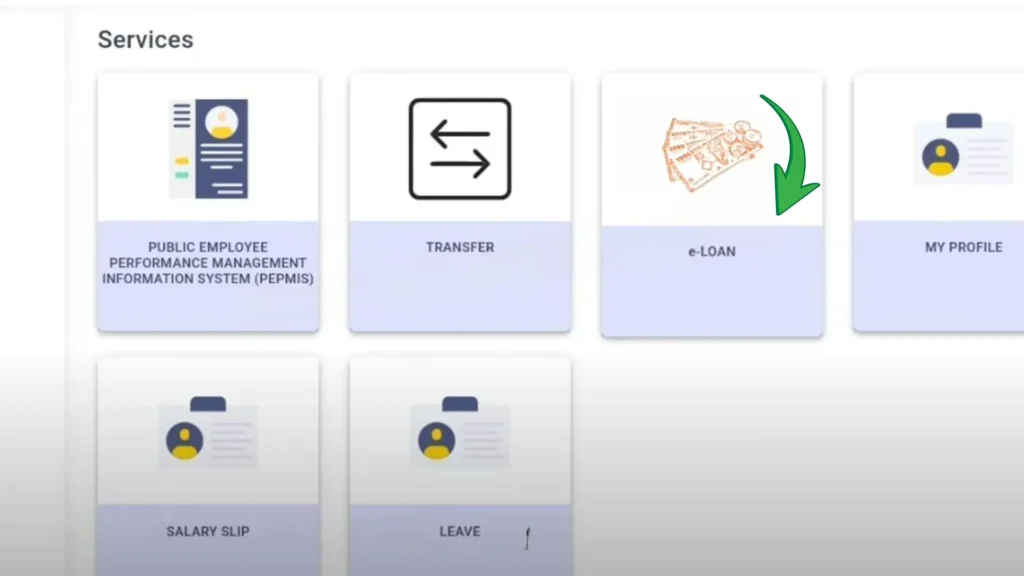
To apply for a loan on the ESS Utumishi portal, you just need to log in to your account. When you are on the dashboard, look for the section labeled “Mikopo” or “Loan Service”. This section is easy to find because it has other important services. When you click on it, you will be taken to the new page. All the loan options are listed on this page. It is the starting point of your loan application.
2. Filling out the Loan Application:
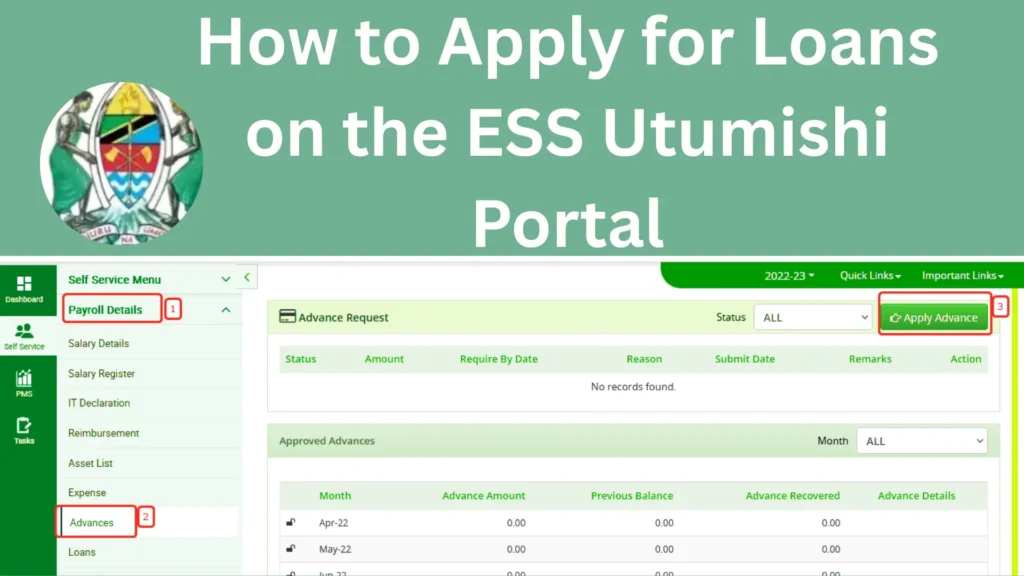
You will see an online application form after opening the loan section. You must fill it out with correct information. You can use your name, check number, and other required personal details. Make sure that you have entered everything carefully to avoid errors. This portal will guide you step by step so the process feels simple. Before moving to the next step, double-check your details.
3. Choosing Loan Type, Amount, and Purpose:
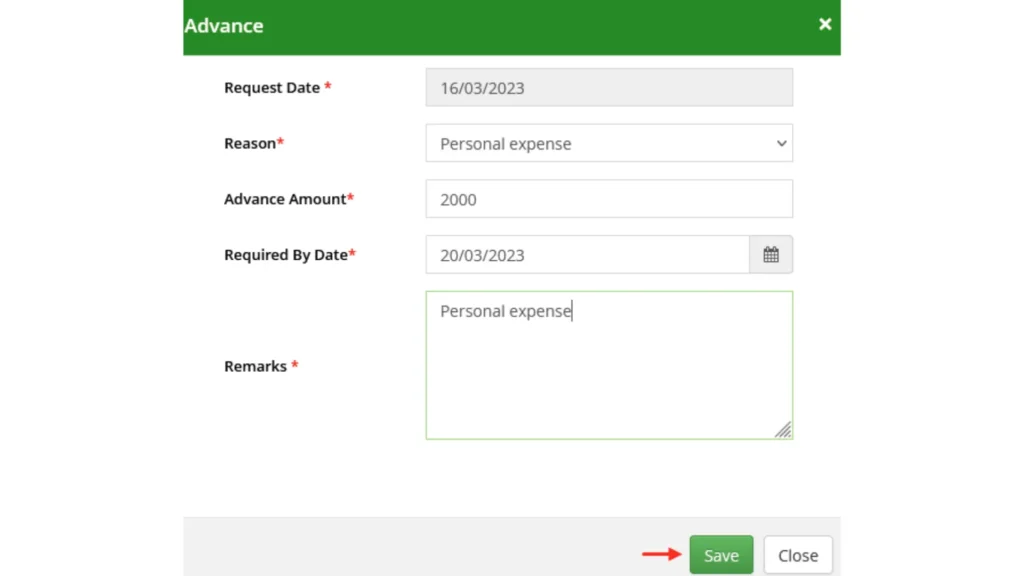
You will be asked to select the type of loan you want to apply for. This can be a personal loan, an emergency loan, or another category available on the portal. You have to explain the purpose of the loan and the amount you want to borrow. You can get clear options, so you can select what suits your needs. This section helps the system to understand your request properly.
4. Submitting the Application and Tracking Status:
After completing the form and loan details, click on the “Submit” button. For review, your application will be sent to the responsible team. You will receive a confirmation message and get an email with updates. You can also check your loan status directly from the portal anytime. In this way, you will know about the approval of your loan. Overall, the process is simple, quick, and fully online.
Benefits of Registering on the Portal
Easy Access to Job-Related Information
When you register on the ESS Utumishi portal, you can check all your job details anytime. It includes your salary, deductions, leave balance, and personal records. You don’t need to visit the HR office or wait for someone to give information. In just a few clicks, you can get everything online. It keeps you updated every month and saves time.
Reduced Paperwork and Queue Time
With this portal, you can avoid long lines at government offices. You can complete most tasks online instead of filling out paper forms or waiting in queues. Everything is digital if you want to apply for leave or update your details. This makes the whole process fast and stress-free. It also reduces the risk of losing paperwork.
Ability to Track Performance and Leave
It is one of the best features of this portal. It can track your performance and leave a history easily. You can see how many leave days you have and how many are left. With the performance section, you can understand how you are doing your work. Throughout the year, you can plan better and stay organized with this information.
Convenient Loan Application
This portal makes it easy to apply for loans online. You can choose the loan type and submit it without visiting any office. You can also check the status of your application on the portal. This saves time and helps the employees get financial support more quickly. It makes the process smooth and transparent.
Secure and Reliable Record Keeping
The portal stores all your important records safely using a secure system. Your personal information, salary details, and job history are protected and kept private. This reduces mistakes, which can happen in manual record keeping. Without worrying about losing documents, you can access your data anytime. It ensures that your information is always accurate and up to date.
Easy Updates of Personal Information
You can update it directly on the portal if you change your email, phone number, or home address. You don’t need to submit physical forms or contact the HR department. This process takes only a few minutes. You can receive important notifications if you keep the correct information.This helps to avoid communication problems in the future.
Available Anytime, Anywhere
The other benefit is that the portal works 24/7. From your computer or phone, you can log in. The busy employees who cannot visit the office during working hours find it useful . It gives you freedom and flexibility to manage your work information easily.
Security and Privacy on ESS Utumishi Portal
The security and privacy on the ESS Utumishi portal are handled with great care to protect your personal information. The portal uses a strong security system. It helps to keep your details safe. These details include salary information, National ID number, and personal records. It is important to create a strong password to stay more secure. Never share your login details with anyone, like your friends or coworkers. To stay more secure, it is important to create a strong password.
To keep extra privacy, never share your login details with anyone. When you stop using the portal, it is important to log out. When you are using a shared computer or phone, logging out every time is necessary. With these simple steps, you can use the portal safely and securely. You can also keep all the information protected.
Common Registration Errors and How to Fix Them
1. Email Verification not Received:
This happens when your email is typed incorrectly or the message goes to spam.
2. Portal Downtime:
Due to maintenance or heavy traffic, the website may not load properly.
3. Password not accepted:
The portal may reject weak or mismatched passwords.
4. Account not Activating:
The activation process fails when the verification step is incomplete.
5. Still Unable to Register:
When all steps fail, the issue may be technical.
Tips for a Smooth Registration Process
Conclusion
It is an important step for employees to register on the ESS Utumishi. The employees can get easy access to their work information. The process is simple and easy. You have to follow the steps carefully and enter the details. It is good to keep your documents ready to complete the registration process. After registration, you can quickly check your salary slips, leave balance, personal data, and other services anytime.
You don’t need to stand in long queues or visit the office. It can also save your time and reduce paperwork. The employees can do all the tasks by signing up for the app. In short, it is a very useful app for government employees to access important job-related services easily.
Frequently Asked Questions
1. Who can register on the ESS Utumishi Portal?
Only Tanzanian government employees can register and use the portal. The private or non-government employees are not eligible.
2. Is registering on the portal free?
You can create an account on the ESS Utumishi portal free of cost.
3. What documents are needed to register?
You need your National ID card, check number, and a valid email address to complete the registration.
4. What should I do if I don’t receive the verification email?
Check your spam or junk folder first. Make sure your email was entered correctly and try registration again.
5. Can I register using my mobile phone?
You can register using the ESS Utumishi mobile app or website web browser on your phone, tablet, or computer.